
Captar o sinal certo, e não apenas mais sinais, é o que distingue um programa de risco robusto de um programa repleto de ruído. A versão deste mês aprimora exatamente esse aspeto. A triagem agora verifica pseudónimos e nomes comerciais, além do nome registado, e a monitorização de riscos de criptoativos sinaliza uma alteração real no risco de uma carteira, em vez de voltar a verificar todas as transações. O processamento FinCEN 314(a) também passa a ser realizado integralmente na Sardine, pelo que um pedido que antes era encaminhado através de um fornecedor separado passa agora a ser tratado do início ao fim num único local.
Confira o que lançamos em julho.
Os destaques:
- Central de triagem FinCEN 314(a). Faça upload, compare e audite listas 314(a) diretamente na Sardine.
- Correspondências mais claras de aliases e nomes comerciais. Analise o alias ou nome fantasia exato associado a uma correspondência de sanções, PEP ou mídia adversa, mantendo o contexto preservado na trilha de auditoria.
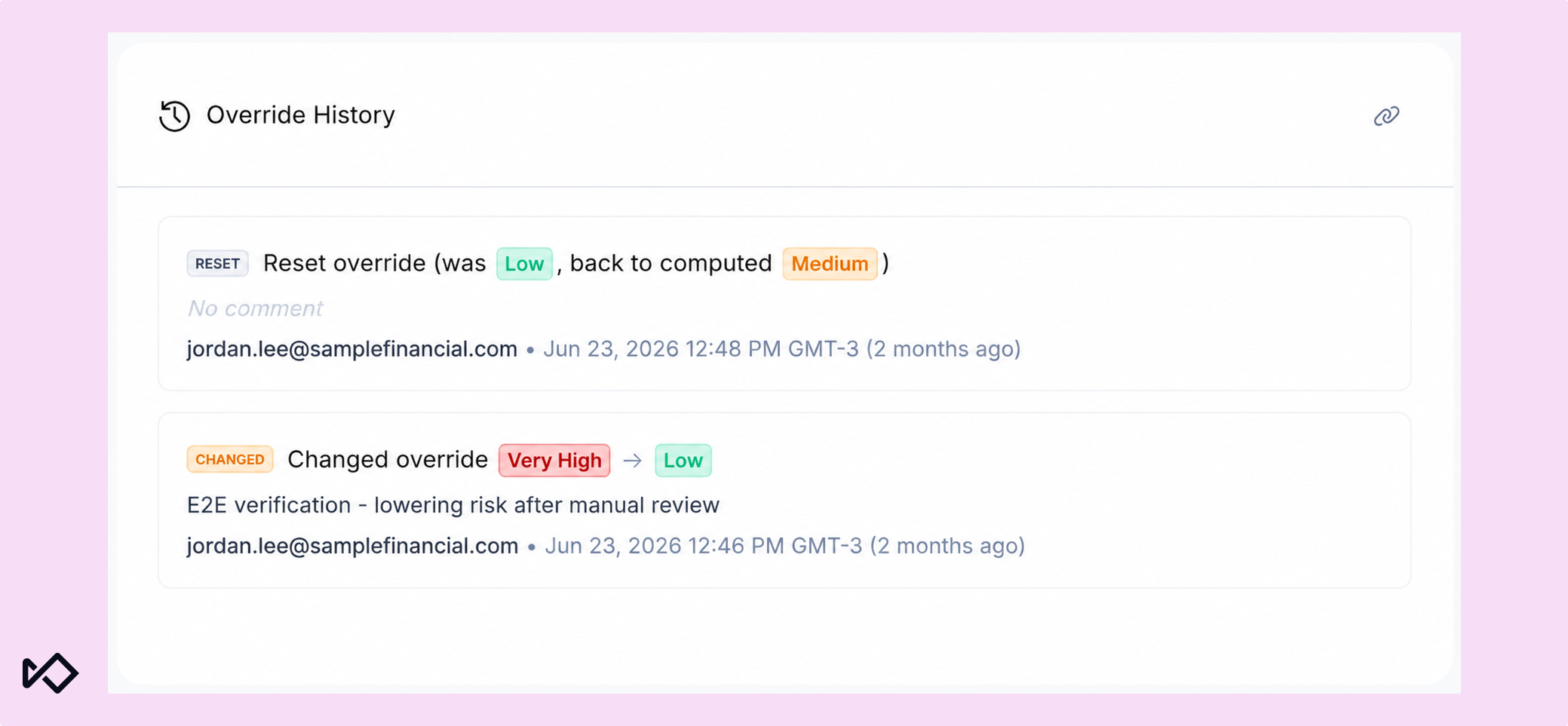
- Histórico de substituições do nível de risco. Um registro único, com data e hora, de cada alteração manual do nível de risco nos perfis de CDD e BCDD: motivo, revisor e data de expiração.
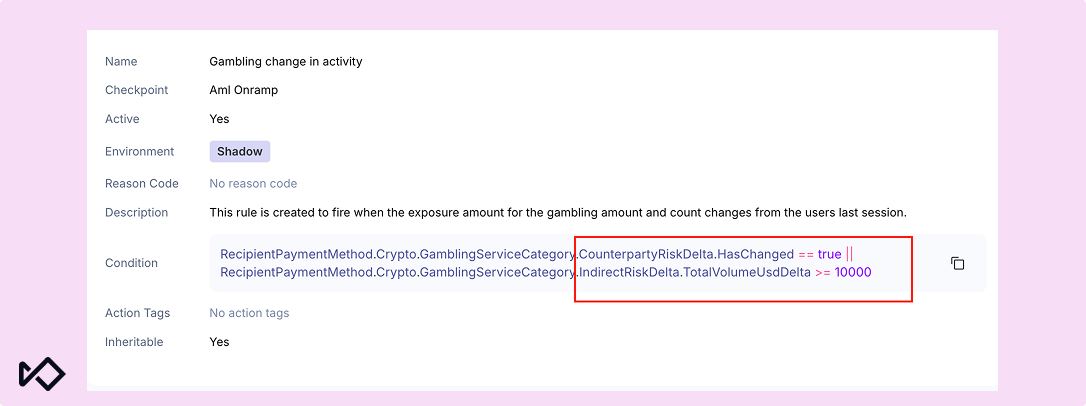
- Regras de deteção de alterações em criptoativos. Acione a monitorização quando houver uma alteração real no risco de uma carteira, e não a cada transação.
- Cobertura ampliada de redes blockchain. A triagem de criptomoedas em lote agora abrange 126 redes, em vez de 48, oferecendo total paridade com a API em tempo real.
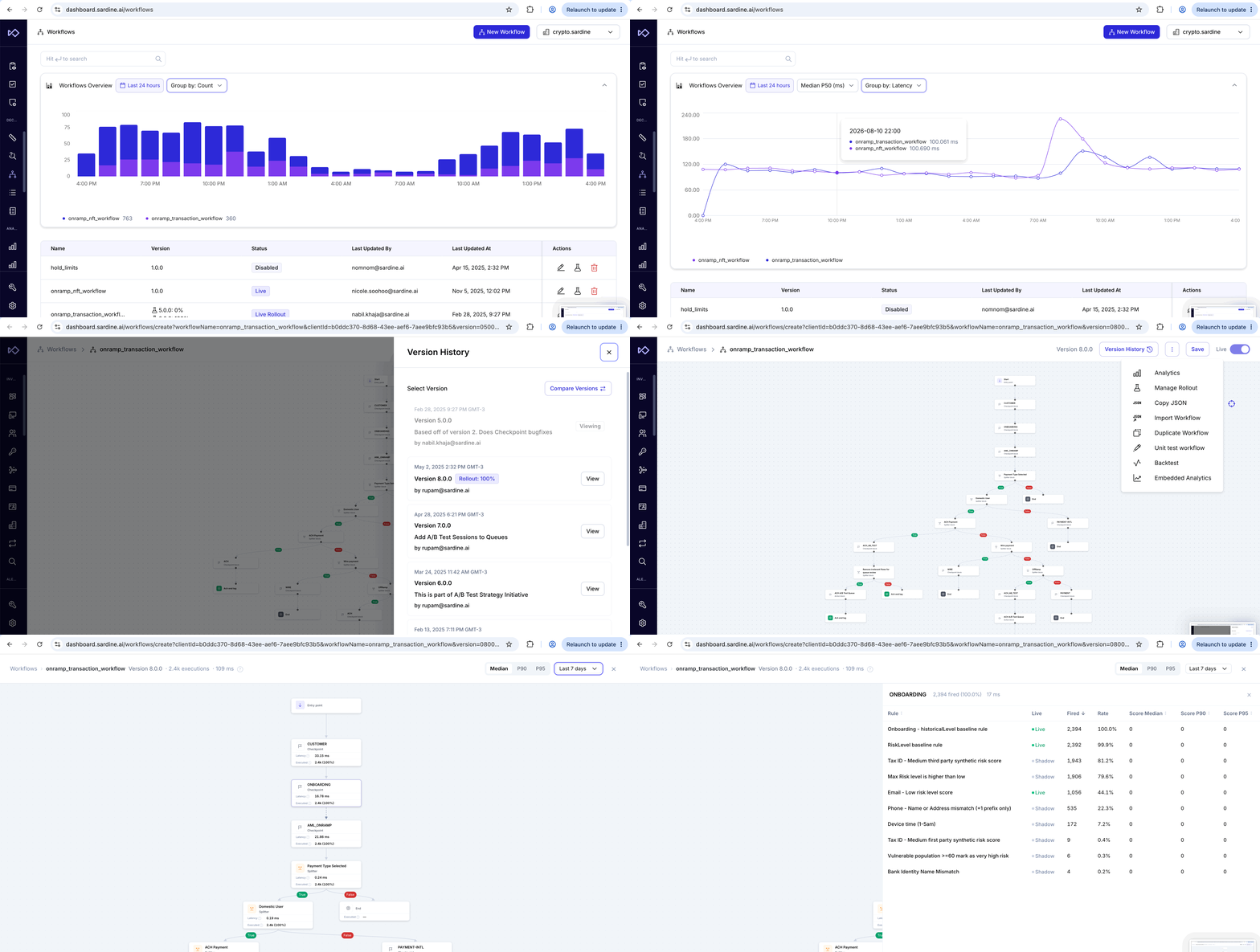
- Análises integradas de fluxos de trabalho. Volume de execuções, distribuição de resultados e latência, tudo no editor de fluxos de trabalho, além de um novo selo que identifica os alertas acionados por um fluxo de trabalho.
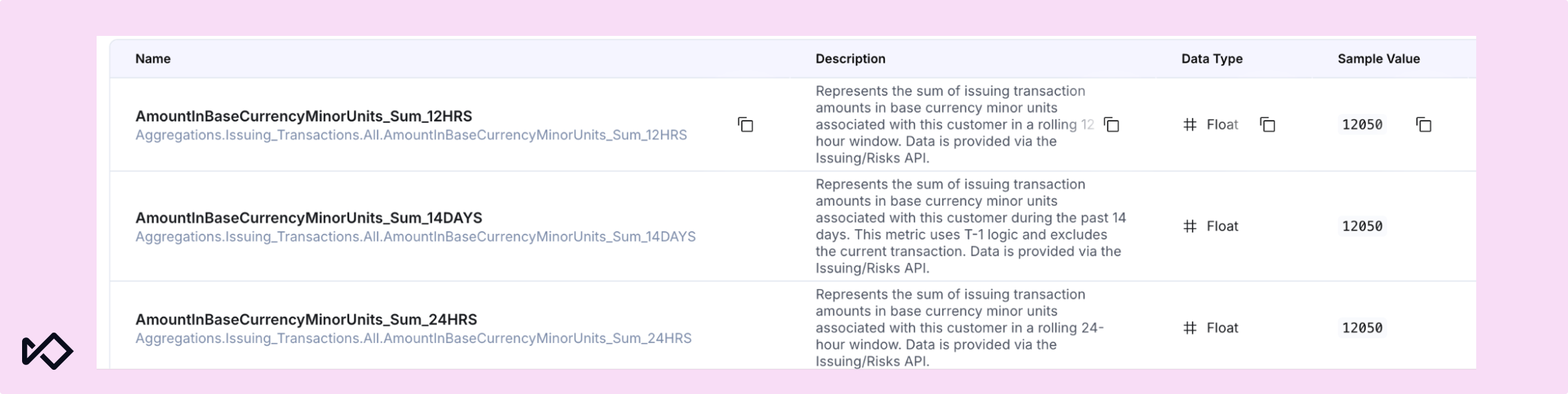
- Agregações de transações do Issuing. As agregações em streaming substituem as consultas em tempo real ao banco de dados nas regras de risco do Issuing, com novas janelas de análise retroativa e visualizações por categoria.
Conformidade com AML: cobertura de triagem mais robusta, menos falsos positivos
Central de Triagem FinCEN 314(a)
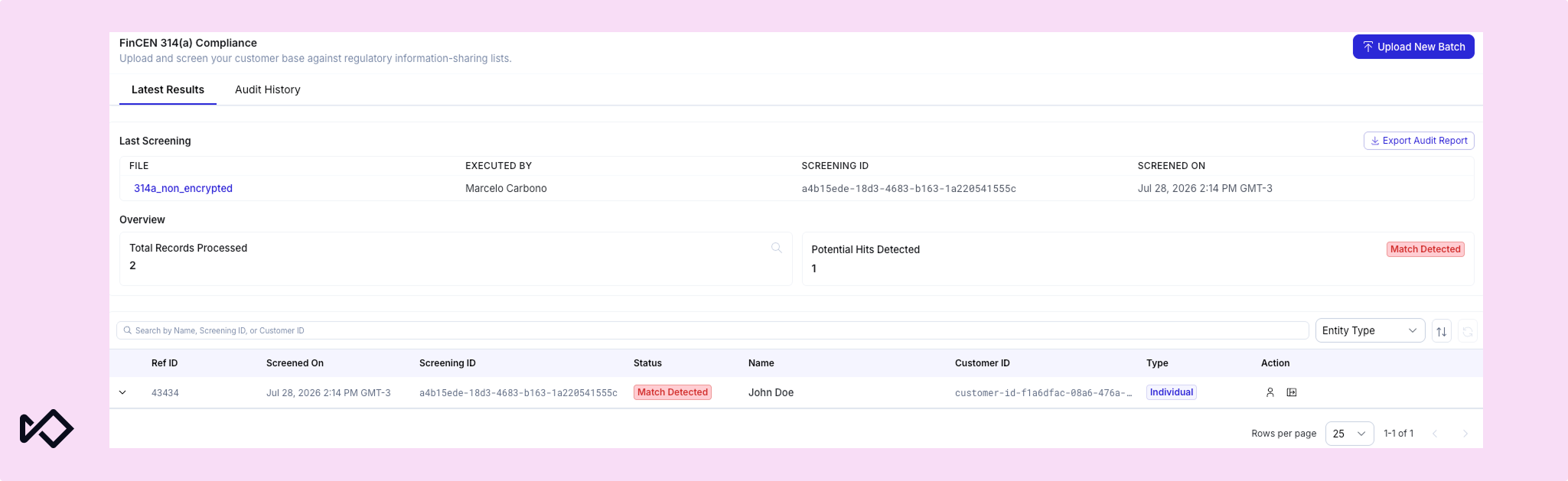
O Hub de Triagem 314(a) permite carregar listas, realizar correspondências e consultar o histórico de auditoria de solicitações FinCEN 314(a) diretamente no Sardine. Basta carregar uma lista uma única vez para que o sistema faça a correspondência com pseudônimos, números de Segurança Social (SSNs), números de telefone, endereços e contrapartes de transações — e não apenas com o nome principal —, o que representa um verdadeiro salto de precisão em relação à correspondência baseada apenas no nome. Cada envio de ficheiro constitui um evento de triagem único, realizado com base nos dados dos seus clientes e das suas transações abrangidos pelas suas obrigações.
A vista Resultados mais recentes mostra quem carregou um ficheiro e quando, permite descarregar a lista original, exportar os resultados da auditoria, carregar um novo lote e filtrar as correspondências por tipo de entidade — pessoa singular ou empresa. O Histórico de auditorias mantém um registo cronológico contínuo de todas as listas processadas, incluindo o estado (ativo, concluído, com falha ou em processamento), o número de registos e o número de correspondências, com a possibilidade de filtrar por data. Quando um auditor solicita informações sobre um ciclo específico, basta uma pesquisa no painel.
Correspondências mais claras de pseudónimos e nomes de empresas
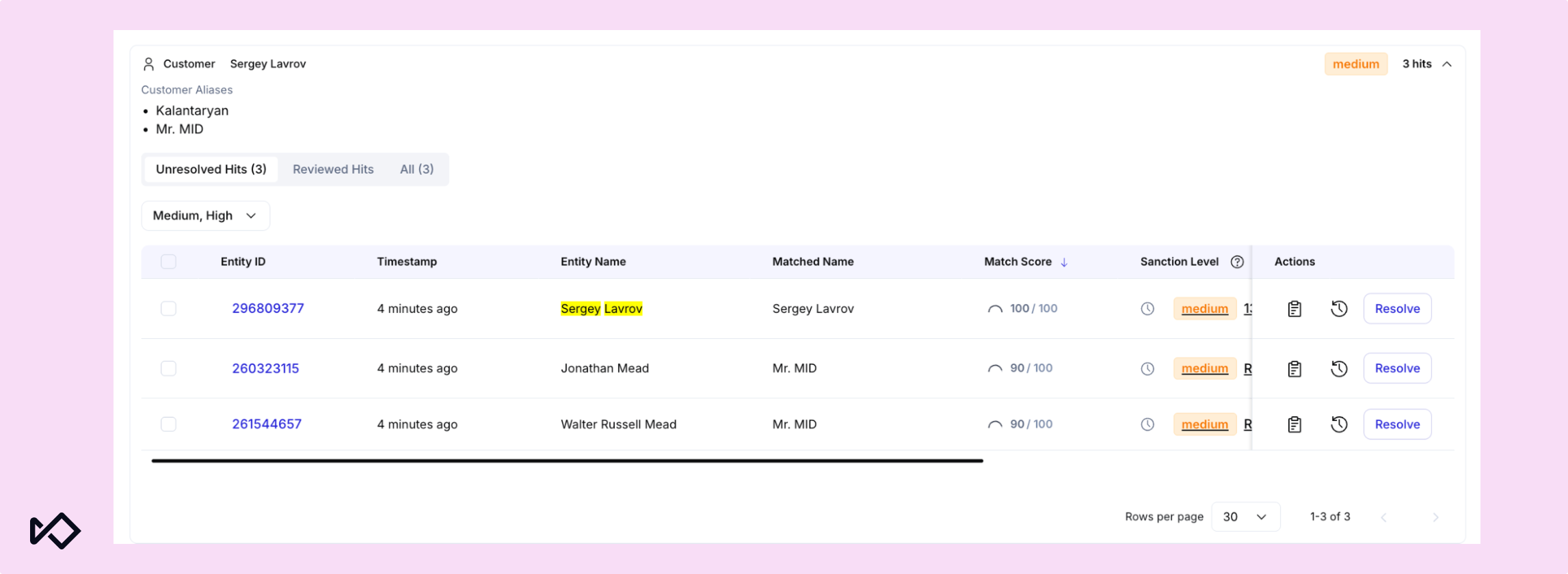
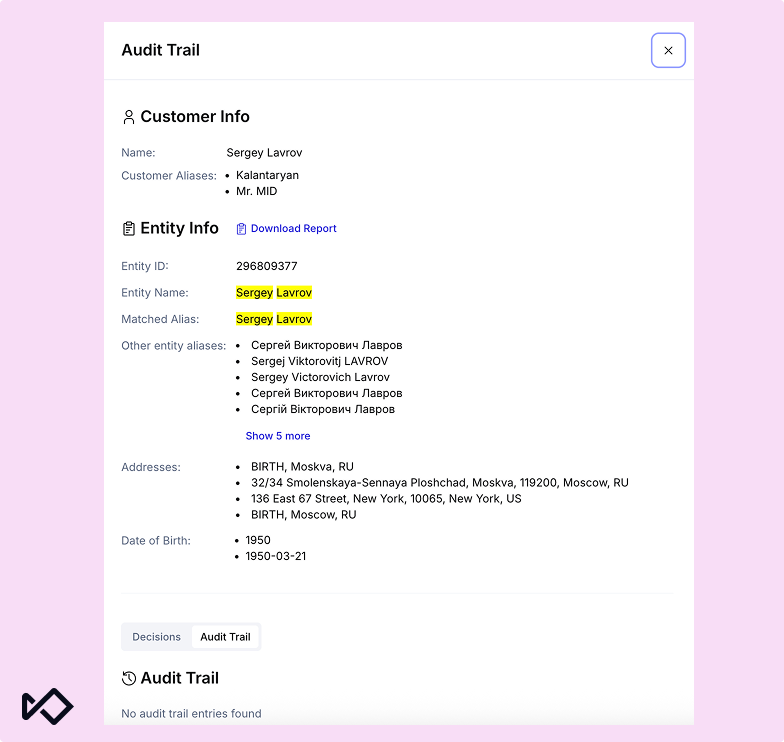
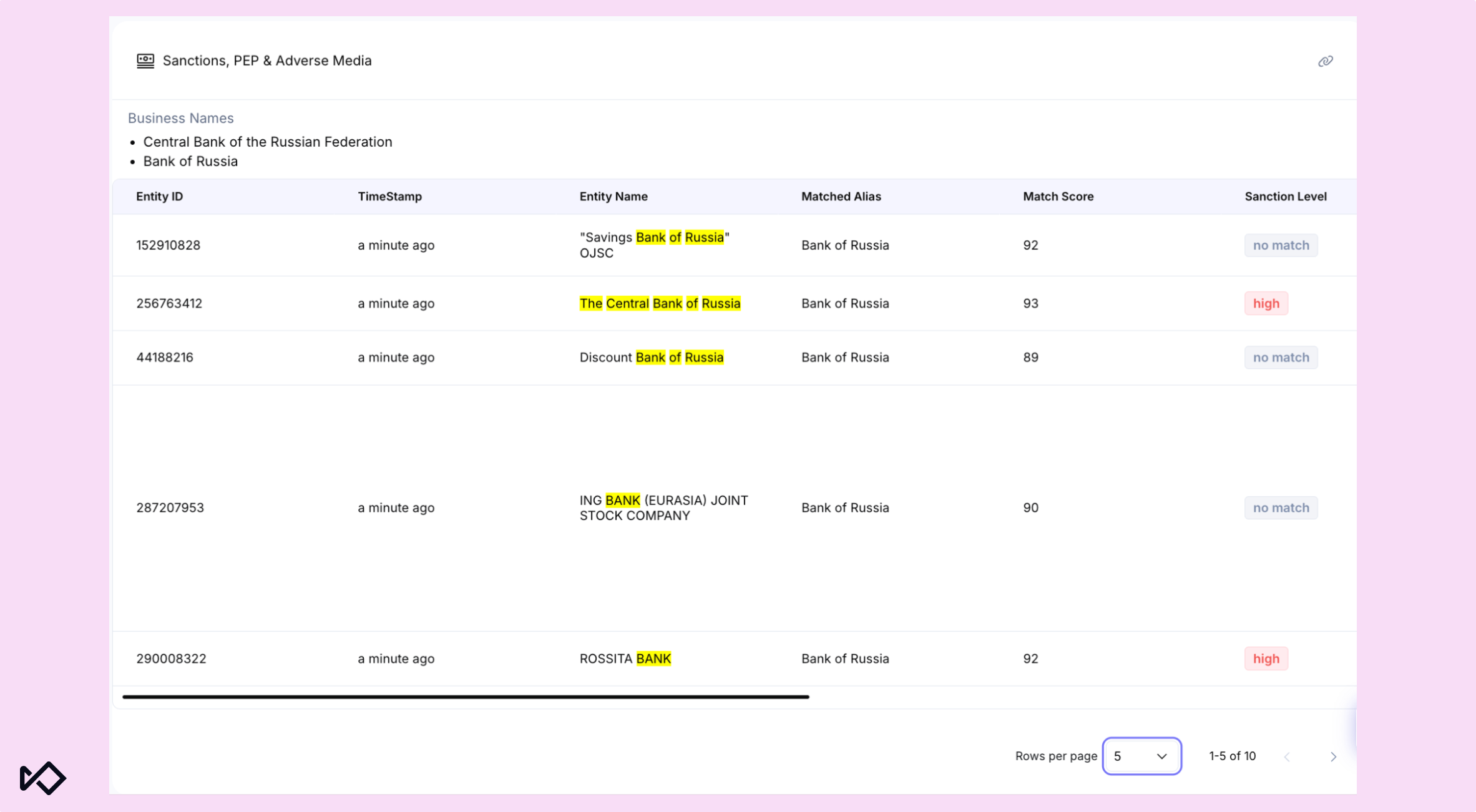
Agora, é mais fácil analisar correspondências de pseudônimos e nomes comerciais durante o processo de triagem. No painel, o widget de triagem exibe separadamente os pseudônimos enviados diretamente no cabeçalho do cliente, e uma coluna específica, Nome correspondente, mostra aos analistas qual nome gerou a correspondência. Os detalhes dos pseudônimos também são registrados na trilha de auditoria junto com o resultado da triagem.
Para usuários da API, aliases individuais podem ser enviados por meio de customer.aliases, enquanto nomes comerciais ou nomes fantasia (DBAs) podem ser enviados por meio de business.names.
Histórico de substituições do nível de risco
As páginas de titulares de Customer Due Diligence (CDD) e Business Customer Due Diligence (BCDD) incluem agora um painel dedicado ao histórico de substituições, visível para qualquer pessoa com permissões de visualização de CDD. Cada alteração manual do nível de risco é registada de forma imutável, da mais recente para a mais antiga, incluindo o tipo de ação, o motivo indicado, o responsável pela revisão e uma eventual data de validade. Os identificadores com cores distintas para SET, CHANGE e RESET facilitam a consulta do histórico de risco de um cliente. Assim, quando um auditor perguntar por que motivo um nível de risco foi alterado, a resposta estará num único painel, sem ser necessário pesquisar no histórico geral de revisões.
Monitoramento de criptomoedas: menos alertas, mais sinais relevantes
Aprimoramos o monitoramento de criptomoedas para reduzir o excesso de alertas e facilitar a identificação de mudanças de risco relevantes.
Recursos de detecção de alterações em criptomoedas
As novas funcionalidades de deteção de variações comparam o estado de risco atual de uma carteira com o último estado conhecido, permitindo que as equipas atuem perante alterações relevantes, em vez de reavaliarem o perfil de risco completo da carteira em cada transação. Estas funcionalidades identificam alterações como um aumento súbito do volume (TotalVolumeUsdDelta), uma mudança na categoria de risco da contraparte (CounterpartyRiskDelta.HasChanged) ou uma alteração no número total de ocorrências de risco. Podem ser utilizadas em regras e noutros fluxos de trabalho para concentrar as análises nas carteiras em que algo efetivamente mudou.
Cobertura ampliada de redes blockchain
A análise em lote (CSV) agora abrange 126 redes, em vez de 48. Esta cobertura corresponde à que já estava disponível através da API em tempo real e inclui todas as blockchains suportadas pelo nosso fornecedor de serviços de análise. São 78 novas redes, incluindo Near, Sui, TON, Sei, Flow e Fantom. As análises em massa passam agora a ter o mesmo alcance que as verificações em tempo real, independentemente das redes que os seus clientes utilizem, e a documentação pública da API foi atualizada para incluir todas as redes suportadas.
Plataforma: mais visibilidade nos fluxos de trabalho e nas regras de emissão
O último conjunto de alterações afasta-se por completo da verificação e passa a dar visibilidade ao que os seus fluxos de trabalho e regras estão realmente a fazer enquanto o fazem, em vez de ser necessário reconstruir os acontecimentos posteriormente. É uma forma própria de separar o sinal do ruído: saber qual regra foi efetivamente acionada e porquê é o que distingue reagir a um alerta de compreendê-lo.
Análises integradas de fluxos de trabalho
O Embedded Analytics agora está disponível diretamente no editor de fluxos de trabalho, exibindo no diagrama a latência dos nós em tempo real e a porcentagem de vezes que cada regra foi acionada. Um novo gráfico de visão geral dos fluxos de trabalho reúne, ao longo do tempo, o volume de execuções, os resultados das decisões e as latências p50/p95/p99.
Os alertas criados por um nó de ação de um fluxo de trabalho agora também exibem um selo de Fluxo de trabalho na lista de alertas. Em Detalhes do alerta, os analistas podem visualizar todo o histórico de execução para saber exatamente o que gerou um alerta automatizado sem sair da página.
Agregações de transações de emissão
As regras de risco do Issuing agora utilizam agregações de streaming, calculadas continuamente em segundo plano, em vez de serem calculadas em tempo real a cada verificação. Isso também permite usar janelas retrospetivas que antes não eram viáveis: uma nova janela de 90 dias em todas as vistas, vistas de clientes de 12 horas e 14 dias e novas agregações ao nível da categoria por MCC. Para os emissores que processam um elevado volume de transações, as agregações pré-calculadas fazem com que a avaliação das regras deixe de competir com o tráfego em tempo real pelas mesmas consultas durante picos de volume.
Quer ver tudo isso em ação? Entre em contato para solicitar uma demonstração. Os clientes atuais podem consultar todos os detalhes, incluindo as atualizações de gerenciamento de acesso deste mês, as alterações no SDK e os itens de migração de dados, em nossas notas de versão e registro de alterações.