
Detectar la señal adecuada, y no simplemente más señales, es lo que distingue a un programa de riesgos sólido de uno saturado de ruido. La versión de este mes mejora precisamente ese aspecto. Ahora, el proceso de screening comprueba los alias y nombres comerciales, además del nombre registrado, y la supervisión del riesgo de criptoactivos alerta cuando se produce un cambio real en el riesgo de una billetera, en lugar de volver a comprobar cada transacción. El procesamiento de las solicitudes de la Sección 314(a) de FinCEN también pasa a realizarse íntegramente dentro de Sardine, de modo que una solicitud que antes se canalizaba a través de otro proveedor ahora se gestiona de principio a fin en un solo lugar.
Estas son las novedades que lanzamos en julio.
Lo más destacado:
- Centro de verificación FinCEN 314(a). Carga, coteja y audita listas 314(a) directamente en Sardine.
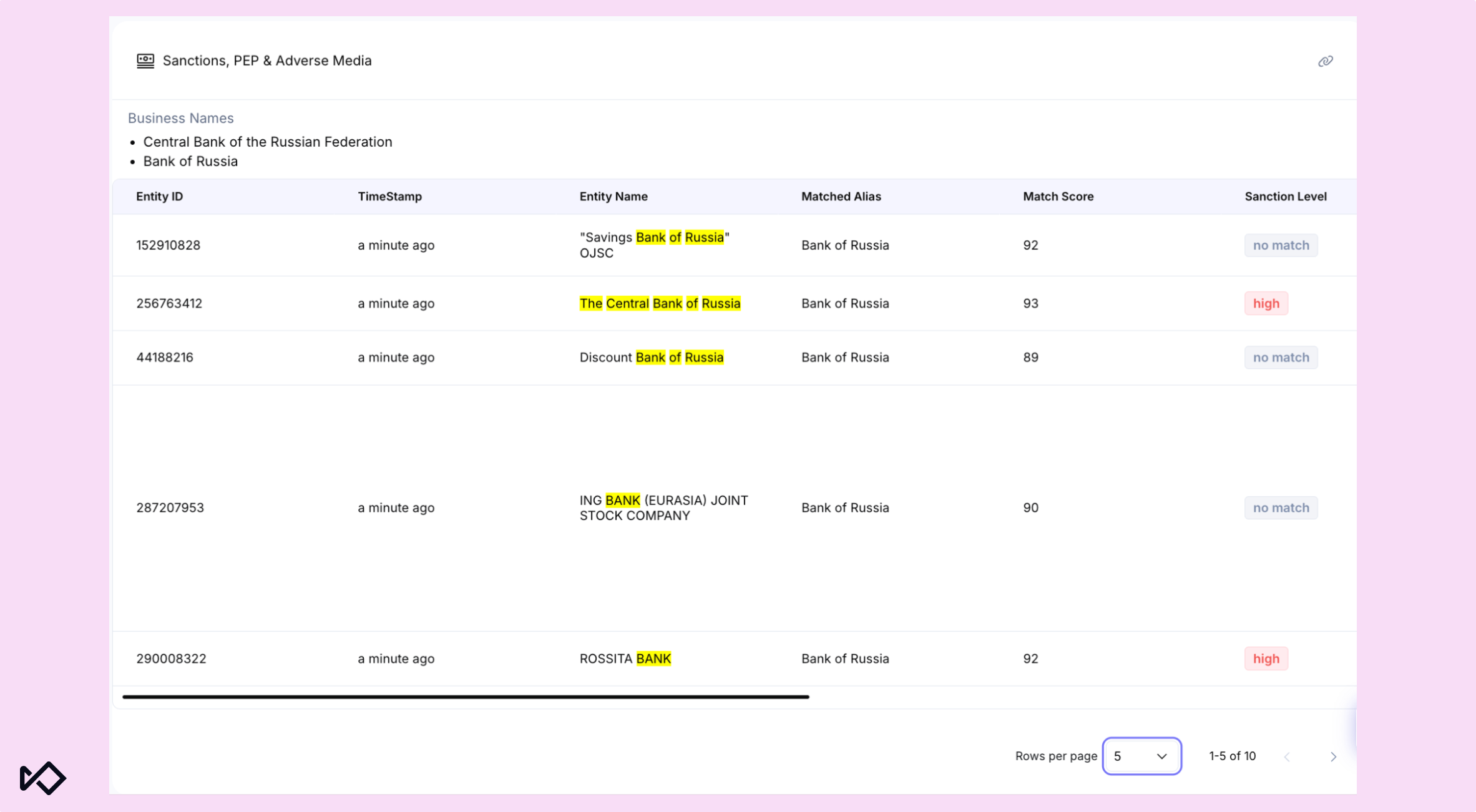
- Coincidencias más claras de alias y nombres comerciales. Revise el alias exacto o el nombre comercial (DBA) asociado a una coincidencia de sanciones, PEP o noticias adversas, con el contexto preservado en el registro de auditoría.
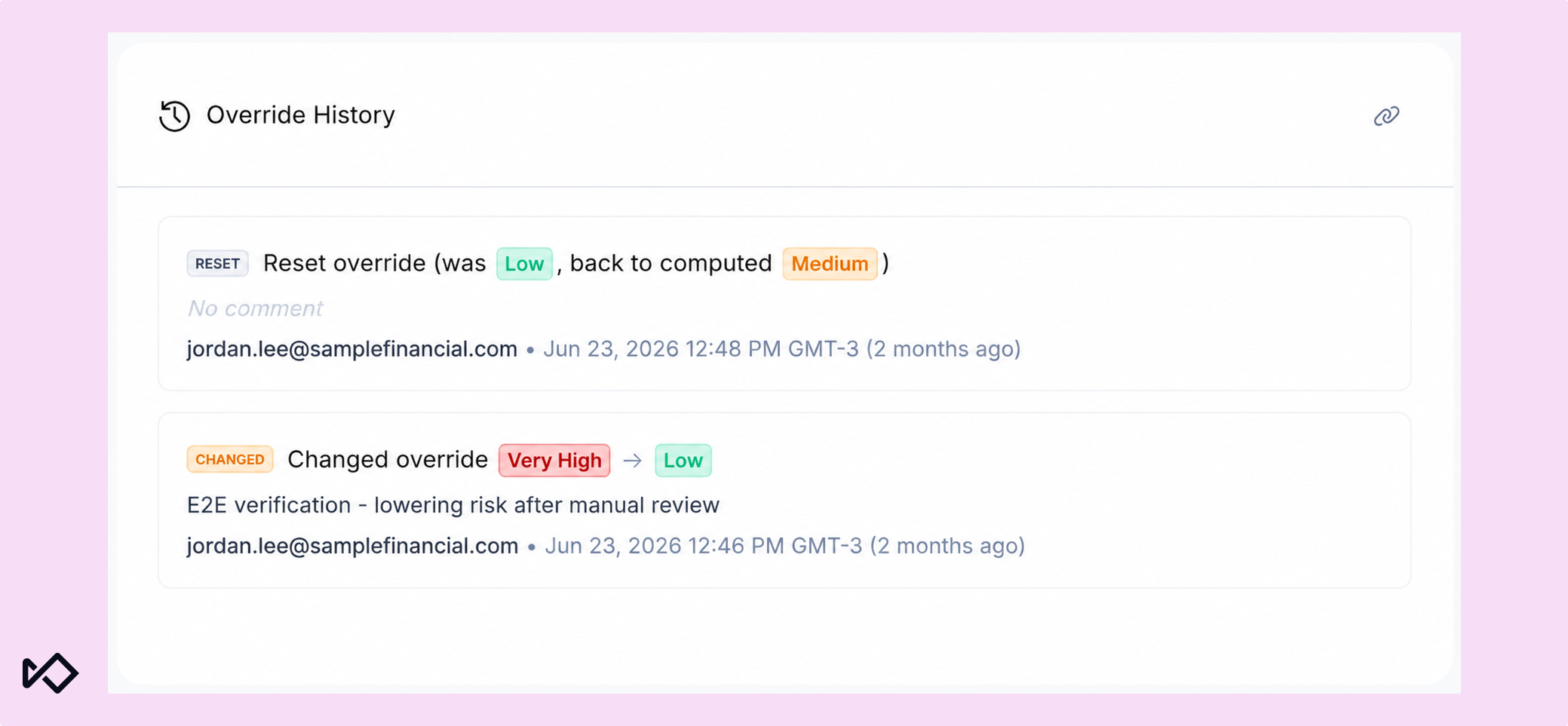
- Historial de modificaciones manuales del nivel de riesgo. Un registro único, con fecha y hora, de cada cambio manual del nivel de riesgo en los perfiles de CDD y BCDD: motivo, revisor y vencimiento.
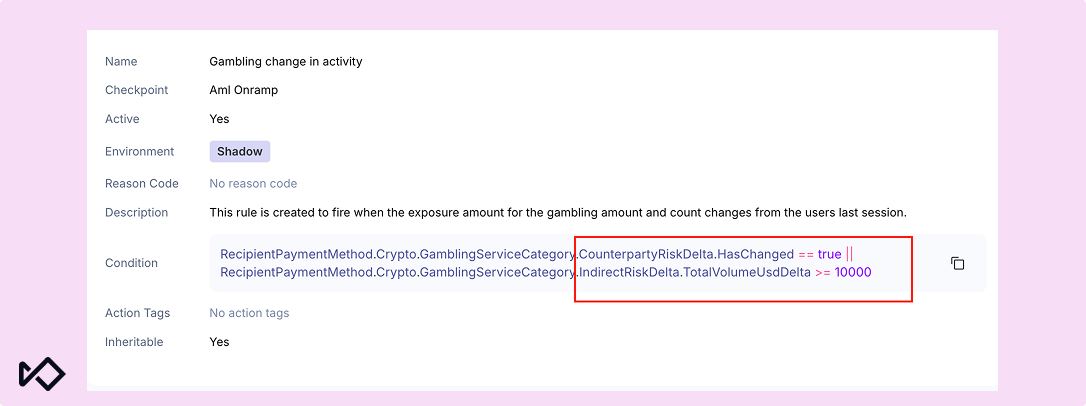
- Reglas de detección de cambios en criptomonedas. Activa la monitorización cuando se produzca un cambio real en el riesgo de una billetera, no con cada transacción.
- Cobertura ampliada de redes blockchain. El análisis de criptomonedas por lotes ahora abarca 126 redes, frente a las 48 anteriores, y ofrece una cobertura idéntica a la de la API en tiempo real.
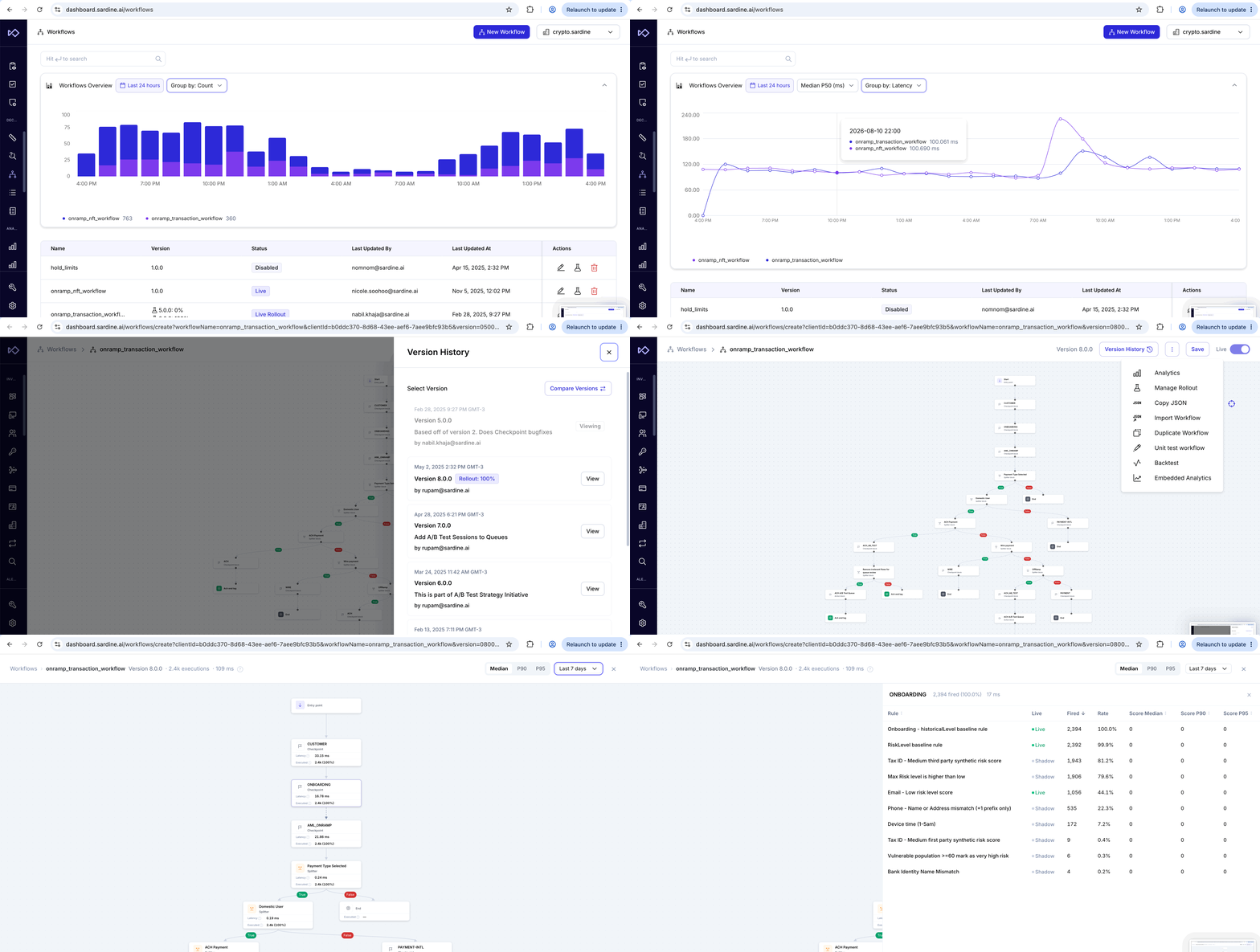
- Analítica integrada de flujos de trabajo. Volumen de ejecuciones, distribución de resultados y latencia, todo ello dentro del editor de flujos de trabajo, además de una nueva insignia que identifica las alertas activadas por un flujo de trabajo.
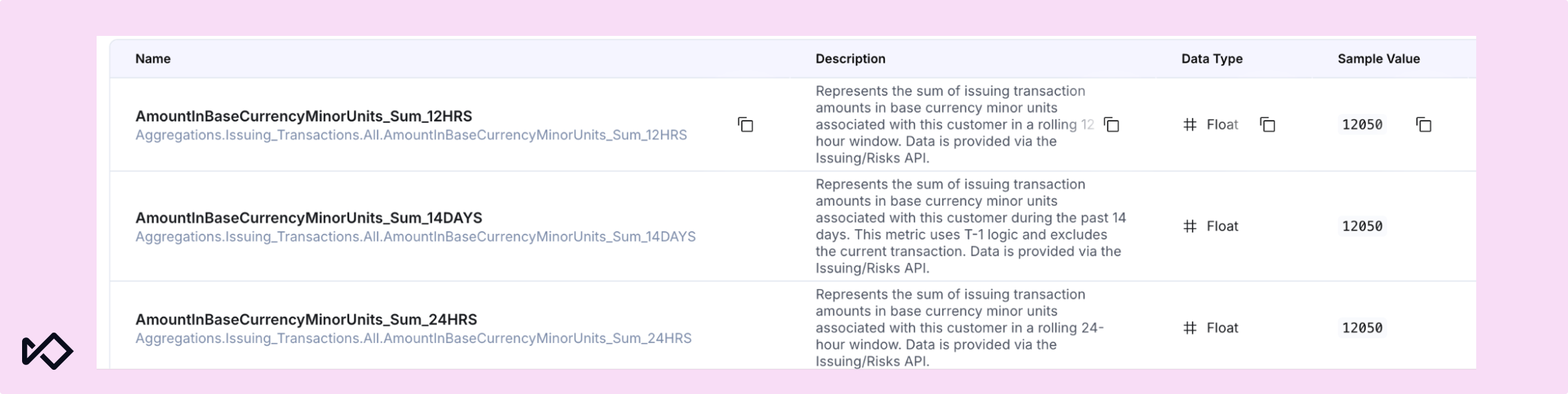
- Agregaciones de transacciones de Issuing. Las agregaciones en streaming sustituyen las consultas en tiempo real a la base de datos para las reglas de riesgo de Issuing e incorporan nuevos períodos retrospectivos y vistas por categoría.
Cumplimiento de la normativa contra el blanqueo de capitales: mayor cobertura de detección y menos falsos positivos
Centro de verificación FinCEN 314(a)
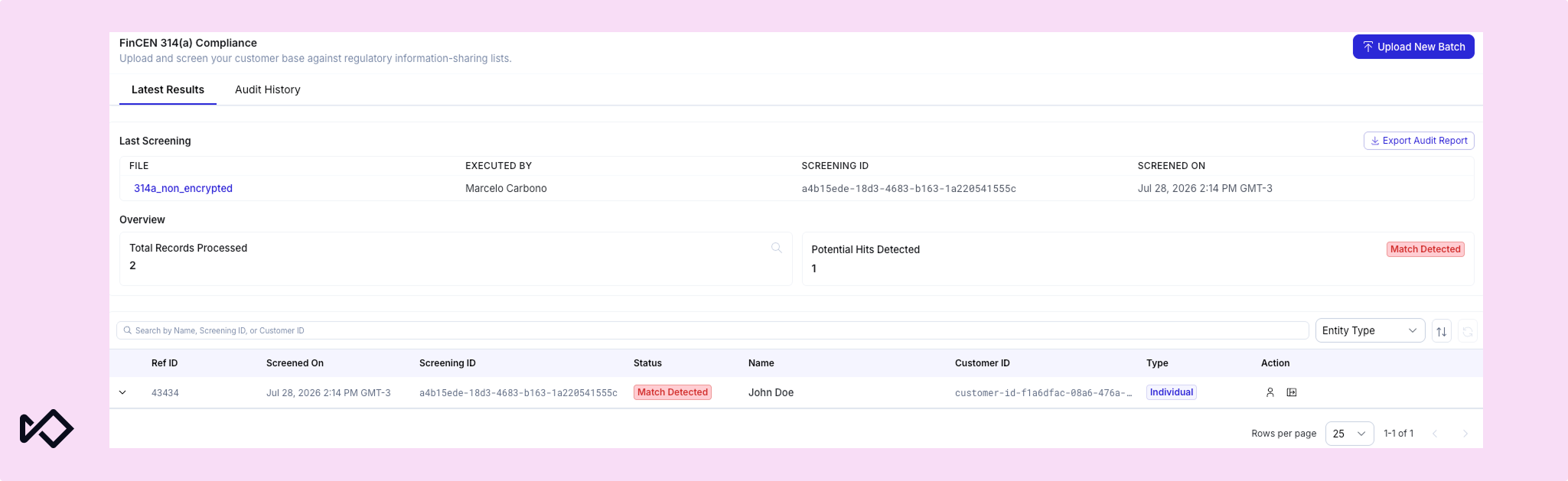
El Centro de Verificación 314(a) permite cargar listas, buscar coincidencias y consultar el historial de auditoría de las solicitudes 314(a) de FinCEN directamente en Sardine. Basta con cargar una lista una sola vez para cotejarla con alias, números de la Seguridad Social (SSN), números de teléfono, direcciones y contrapartes de transacciones, no solo con el nombre principal, lo que supone una mejora considerable de la precisión frente a la búsqueda de coincidencias basada únicamente en nombres. Cada envío de un archivo constituye un evento de verificación único que se contrasta con los datos de clientes y transacciones incluidos en el ámbito de sus obligaciones.
La vista «Últimos resultados» muestra quién subió un archivo y cuándo, y permite descargar la lista original, exportar los resultados de auditoría, cargar un nuevo lote y filtrar las coincidencias por tipo de entidad: persona o empresa. El «Historial de auditoría» mantiene un registro cronológico y continuo de todas las listas procesadas, con su estado (activo, completado, fallido o en procesamiento), el número de registros y el número de coincidencias, y permite filtrar por fecha. Cuando un examinador solicita información sobre un ciclo específico, basta con una consulta en el panel de control.
Coincidencias más claras de alias y nombres comerciales
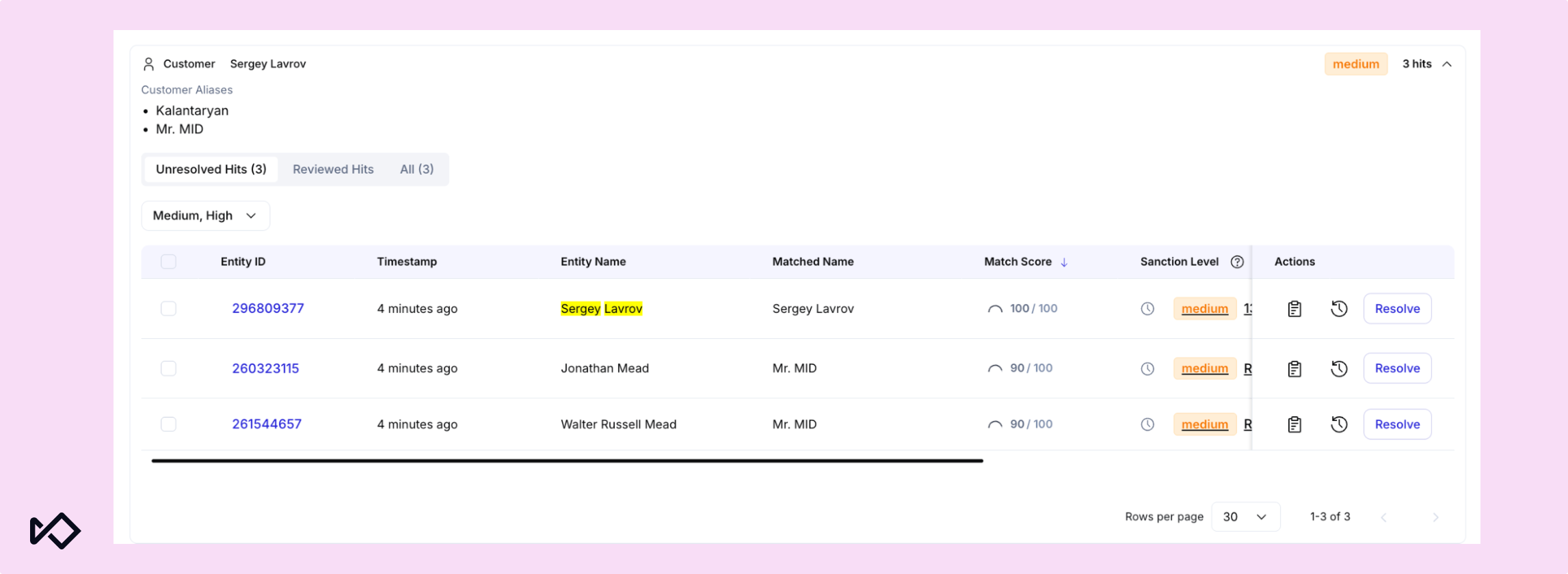
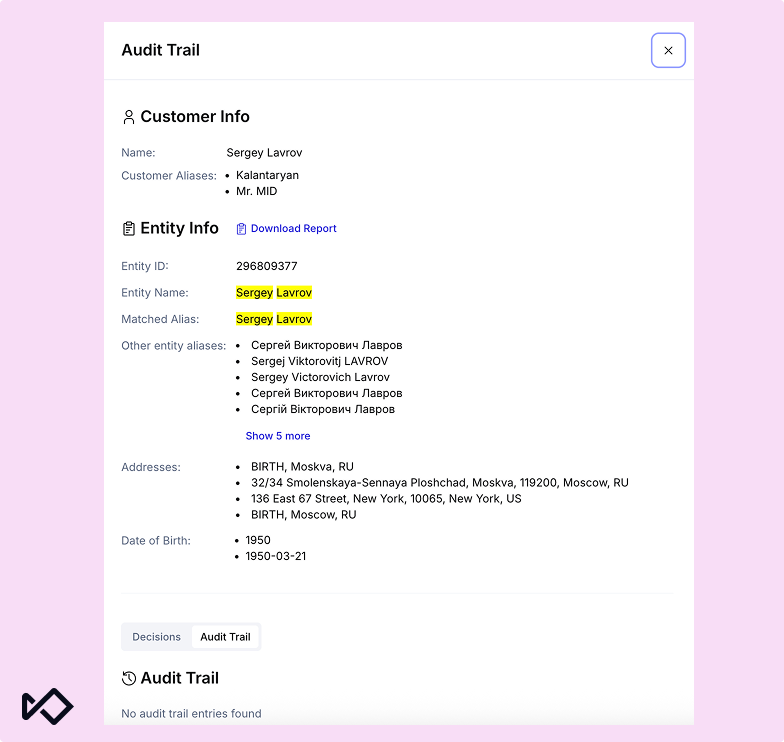
Ahora es más fácil revisar las coincidencias de alias y nombres comerciales durante el proceso de verificación. En el panel, el widget de verificación muestra por separado los alias proporcionados directamente en el encabezado del cliente, y una columna específica denominada «Nombre coincidente» indica a los revisores qué nombre generó la coincidencia. Los detalles de los alias también quedan registrados en el historial de auditoría junto con el resultado de la verificación.
Para los usuarios de la API, los alias individuales se pueden enviar mediante customer.aliases, mientras que los nombres comerciales o nombres bajo los que opera una empresa (DBA) se pueden enviar mediante business.names.
Historial de modificaciones manuales del nivel de riesgo
Las páginas de los sujetos de Diligencia Debida del Cliente (CDD) y Diligencia Debida de Clientes Empresariales (BCDD) ahora incluyen un panel específico de Historial de modificaciones, visible para cualquier persona con permisos para consultar la CDD. Cada cambio manual del nivel de riesgo queda registrado de forma inalterable, del más reciente al más antiguo, junto con el tipo de acción, el motivo indicado, el revisor y la fecha de vencimiento, si la hubiera. Las etiquetas con códigos de color para ESTABLECER, CAMBIAR y RESTABLECER permiten consultar rápidamente el historial de riesgo de un cliente. Así, cuando un examinador pregunte por qué cambió un nivel de riesgo, la respuesta estará en un único panel, sin necesidad de buscar en el historial general de revisiones.
Monitoreo de criptomonedas: menos alertas, más señales
Hemos mejorado la monitorización de criptomonedas para reducir el ruido de las alertas y facilitar la detección de cambios significativos en el riesgo.
Funciones de detección de cambios en criptomonedas
Las nuevas funciones delta comparan el estado de riesgo actual de una billetera con su último estado conocido, de modo que los equipos puedan actuar ante cambios significativos en lugar de volver a evaluar el perfil de riesgo completo de la billetera en cada transacción. Estas funciones detectan cambios como un aumento repentino del volumen (TotalVolumeUsdDelta), una variación en la categoría de riesgo de la contraparte (CounterpartyRiskDelta.HasChanged) o un cambio en el número total de instancias de riesgo. Pueden utilizarse en reglas y otros flujos de trabajo para centrar las revisiones en las billeteras en las que realmente haya cambiado algo.
Cobertura ampliada de redes blockchain
El análisis por lotes (CSV) ahora abarca 126 redes, frente a las 48 anteriores. Esto iguala la cobertura que ya ofrece la API en tiempo real e incluye todas las cadenas de bloques compatibles con nuestro proveedor de análisis. Son 78 incorporaciones, entre ellas Near, Sui, TON, Sei, Flow y Fantom. Los análisis masivos ahora tienen el mismo alcance que las comprobaciones en tiempo real en todas las cadenas que utilizan sus clientes, y la documentación pública de referencia de la API se ha actualizado para incluir todas las redes compatibles.
Plataforma: mayor visibilidad de los flujos de trabajo y las reglas de emisión
El último conjunto de cambios deja por completo de lado el screening y se centra en ver qué hacen realmente tus flujos de trabajo y reglas mientras están en ejecución, en lugar de reconstruirlo a posteriori. Es una forma particular de separar la señal del ruido: saber qué regla se activó realmente y por qué marca la diferencia entre reaccionar ante una alerta y comprenderla.
Analítica integrada de flujos de trabajo
Embedded Analytics ya está disponible directamente en el editor de flujos de trabajo y muestra en el diagrama la latencia de los nodos en tiempo real y el porcentaje de veces que se activó cada regla. Un nuevo gráfico de resumen de flujos de trabajo reúne a lo largo del tiempo el volumen de ejecuciones, los resultados de las decisiones y la latencia p50/p95/p99.
Las alertas creadas por un nodo de acción de un flujo de trabajo ahora también incluyen una insignia de Flujo de trabajo en la lista de alertas. Desde Detalles de la alerta, los analistas pueden consultar el historial completo de ejecución para ver exactamente qué generó una alerta automatizada sin salir de la página.
Agregaciones de transacciones de emisión
Las reglas de riesgo de Issuing ahora se basan en agregaciones de datos en streaming, calculadas continuamente en segundo plano en lugar de hacerlo en tiempo real en cada comprobación. Esto también permite utilizar períodos retrospectivos que antes no eran viables: un nuevo período de 90 días en todas las vistas, vistas de clientes de 12 horas y 14 días, y nuevas agregaciones por categoría basadas en el MCC. Para los emisores que procesan un gran volumen de transacciones, las agregaciones precalculadas evitan que la evaluación de reglas compita con el tráfico en tiempo real por las mismas consultas durante los picos de volumen.
¿Quieres ver todo esto en acción? Ponte en contacto con nosotros para solicitar una demostración. Los clientes actuales pueden consultar todos los detalles, incluidas las actualizaciones de gestión de acceso de este mes, los cambios en el SDK y los elementos de migración de datos, en nuestras notas de la versión y registro de cambios.