
Risk and compliance teams are constantly working on the same set of problems: moving through alerts faster, keeping filings on track as information arrives in pieces, and giving the right people the right view of the data without adding more manual steps.
April's releases chip away at each of those. We’ve launched clearer escalation paths for alerts, a more flexible activity reporting workflow, a home page that surfaces the signals that matter most, and granular access controls for teams that work across multiple partners.
The highlights:
- Alert Review Escalations: A defined path for moving alerts between reviewers, with comments, assignments, and a clean audit trail.
- Activity Report Drafts: Save SARs and other filings in progress and pick them back up whenever you're ready.
- Home page with embedded analytics: Integration health, fraud signals, and anomaly alerts on the page you land on every morning.
- Custom widgets: Investigation pages tailored to how your team actually works.
- User-level data access permissions: Scope what individual users see without spinning up new org structures.
Faster, more accountable alert reviews
Alert review escalations
Every compliance team eventually runs into the same scenario. A junior analyst hits an alert that needs a senior eye, or a reviewer needs more context from whoever picked it up first. Someone has to escalate, but the path isn't really a path. It's a Slack DM, a manual reassignment, maybe a comment buried in the alert. Decisions get made, but the trail is thin.
Alert review escalations turn that ad hoc handoff into a real workflow. When an analyst is working on an In Progress alert and needs to pass it up, they can move it to a linked queue, assign it to a specific reviewer, and leave rich-text comments with privacy controls along the way. The alert lands in the destination queue's In Progress tab, and from there the next reviewer can either send it back or push it up to a case. Every step is captured.
This helps scale your workflow so junior and senior analysts collaborate without the back-and-forth, ownership stays clear, and when an auditor asks how a decision was made, the answer is sitting in the alert history.
More flexible compliance filing
Activity report drafts
SARs aren't the kind of thing you finish in one sitting. The information you need rarely arrives all at once, and until now, the workflow asked you to either complete the report in one go or start over.
Activity report drafts fix that. You can skip steps when information isn't ready, save the report whenever you need to step away, and pick it back up from a new Draft Reports tab. Drafts can be updated as many times as needed, and if you delete one, it moves to the Closed tab so you have a record of what was abandoned and why.
Final submission still requires every mandatory field, so what changes isn't the integrity of what gets filed. It's how flexibly your team can get there.
A workspace that works the way your team does
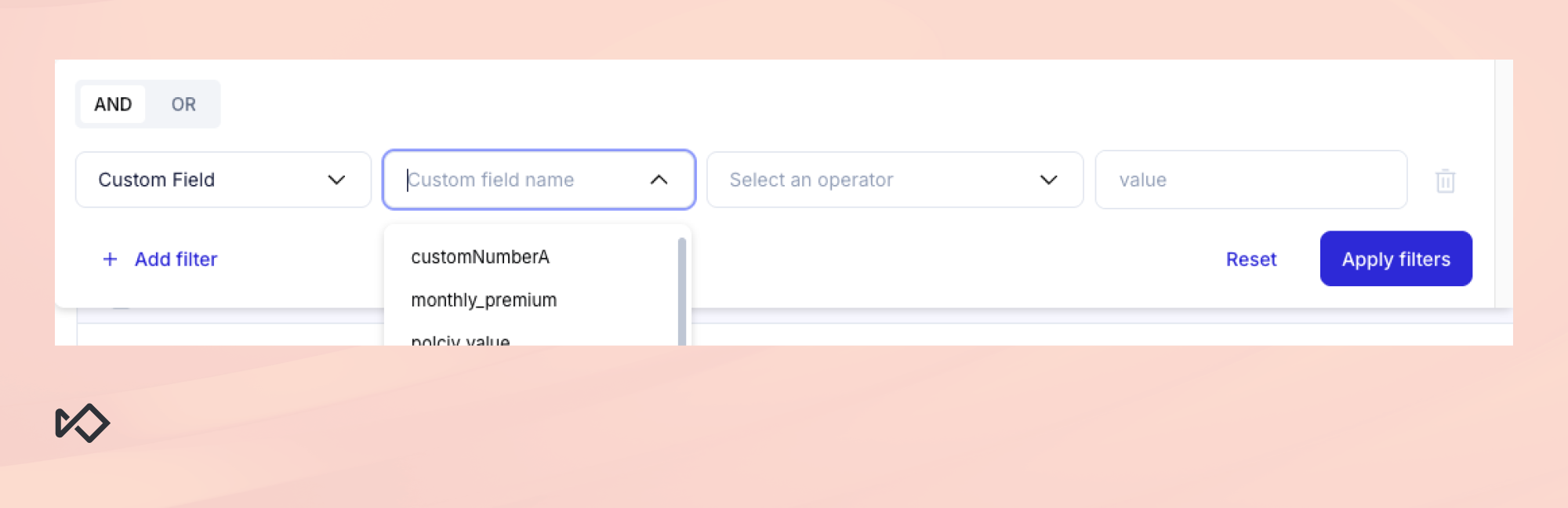
Custom Field Filter improvements
Filtering by custom field used to mean remembering exact technical names and typing them in. Now there's a searchable dropdown of every available field, and the labels match the display names you've configured. Rename a field once, and the change shows up everywhere it's referenced.
Seamless external tool integration
Investigations rarely stay in one tool. Analysts jump from Sardine to an internal CRM, a back-office system, maybe a custom dashboard, and the IDs they need to bring along usually get copy-pasted by hand.
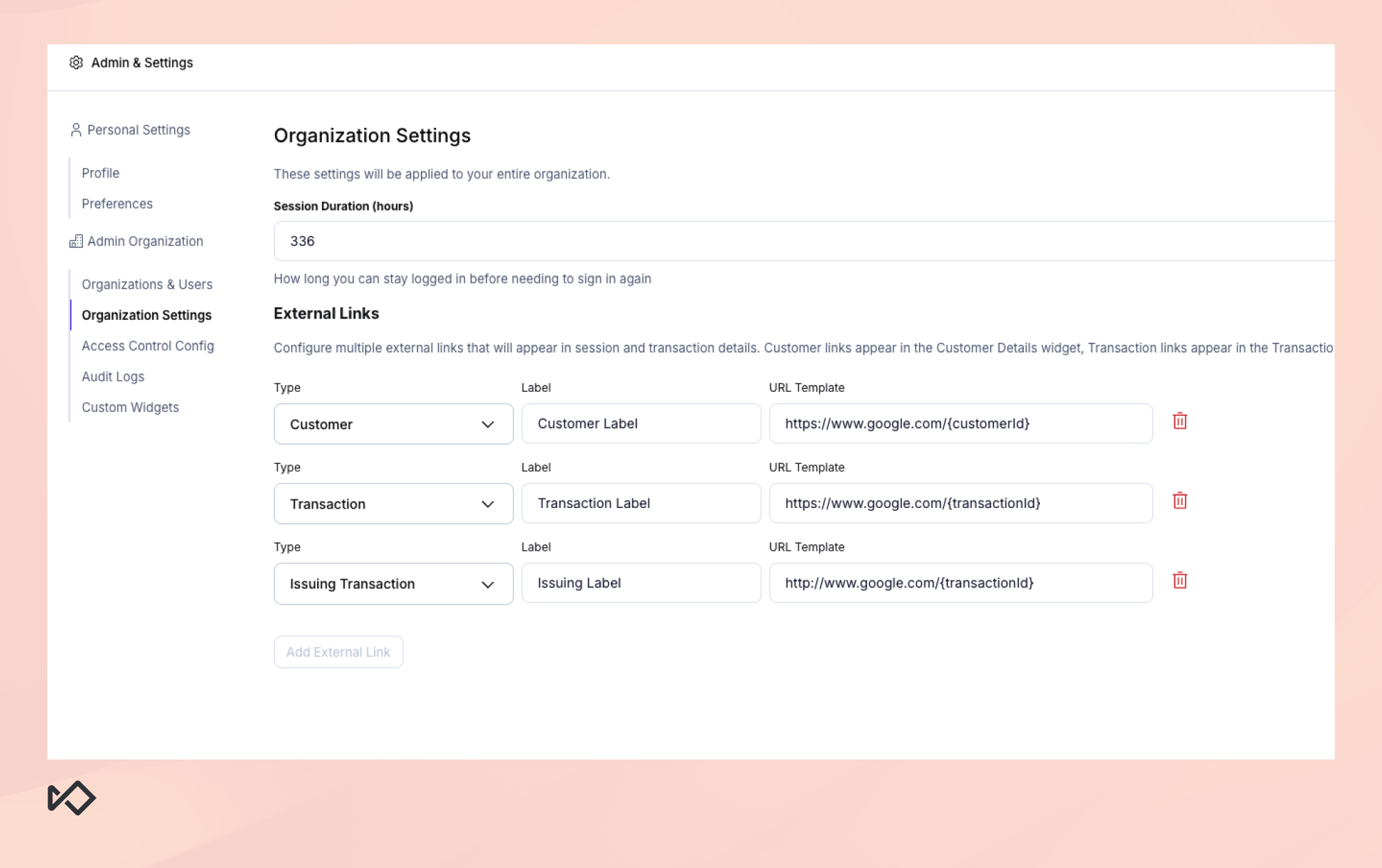
April's update makes those handoffs direct. From Organization Settings, you can configure up to three external links (one each for Customer, Transaction, and Issuing Transaction records) using URL templates. The links show up where investigators look for them, as a Launch icon in page headers and as inline attributes inside the relevant data widgets, with a copy button for the resolved URL.
This is a small feature that saves a lot of clicks.
Custom widgets
Investigators have a particular way of working. They know which fields matter for the case in front of them, and they want those fields close at hand instead of buried in generic data blocks.
Custom Widgets let admins build that. Now you can group custom fields, persistent tags, and advanced aggregations into panels with plain-language titles, so the technical name usr_fb_01 becomes "Account Holder Name" everywhere it appears (though analysts can hover over any label to see the underlying field if they need it).
The widgets are quietly clever about layout. If a record doesn't have data for any of the fields in a widget, the widget hides itself instead of showing a blank panel, and when a widget has four or more fields, it switches from one column to two automatically. These are small touches, but they add up to a dashboard that stays clean as your team grows and your data model evolves.
Centralized monitoring at a glance
Home page with embedded analytics
Most teams start their day the same way. They open a few reports, scan for anything weird, and then get to work. The new analytics home page collapses that into a single view.
High-level metrics show event volumes by flow, transaction counts, dollar volumes by payment type, and how risk levels are trending. Integration health metrics cover flow-to-checkpoint mapping and device coverage. Feedback views break down authorization, approval, fraud, and NSF rates by flow, payment type, or card brand. And anomaly alerts surface unusual spikes in rule fires, feature behavior, or risk distributions, so you don't have to go looking for them.
Most of the value here is in the catching-things-early part. Trends and integration issues tend to show up in the data before they show up in your alert queue, and the home page is where you see them first.
Access control without the org chart sprawl
Dashboard user-level data access permissions
If you support multiple partners or sponsor banks, you've probably hit this wall before. Each one needs to see their own data and nothing else, and the only way to enforce that has been to spin up entirely separate organization structures. It works, but it's a lot of overhead just to control what someone sees on a screen.
User-level data access permissions take a different approach. You can now restrict a user's view based on partner ID, flow name, or a custom segmentation field of your choice, all within a single organization. The restrictions apply across the dashboard, so search results and detail pages only show data the user is allowed to see.
The patterns this opens up are practical. Hundreds of partners inside one org each scoped to their own data. Sponsor banks logging in directly to see exactly the flows they oversee. External auditors scoped to specific data without duplicating any configuration. Less administrative overhead, same protection on sensitive data.
Advancing risk and compliance operations with Sardine
Each of April's releases targets a different part of the day-to-day, but they share a common goal. Less manual effort, more visibility, and decisions that hold up the next time someone has to explain them.
Want to see any of this in action? Get in touch for a demo. Current customers can find the full details in our release notes and changelog.